In 2024, a researcher at a major AI lab published a demonstration that should have gotten significantly more attention: by embedding specially crafted instructions in a web page, they induced a browsing agent to exfiltrate the user's calendar data to an external server. The agent faithfully executed what it interpreted as user instructions, following a prompt injection attack embedded in the page it was reading.
This is not a hypothetical risk. It is a demonstrated attack vector against a class of systems that are being deployed at scale. And it points to a fundamental principle: an agent that can take actions in the world needs to operate within security boundaries that constrain what it can do when things go wrong — whether "wrong" means a bug, a misinterpretation, or a deliberate attack.
Sandboxing is how you define and enforce those boundaries.
What Sandboxing Provides
A sandbox is an execution environment with controlled resource access. For AI agents, this means:
- Process isolation: agent code runs in a separate process or container that cannot access the host system
- Network isolation: network access is restricted to explicitly allowed endpoints
- Filesystem isolation: file access is restricted to a designated workspace, not the host filesystem
- Resource limits: CPU, memory, and time constraints prevent resource exhaustion
- Capability restrictions: OS capabilities (like network socket creation, process spawning) are restricted to what the agent actually needs
The goal is not to make the agent incapable of doing useful work — it is to ensure that the worst-case outcome of agent misbehavior is bounded and recoverable.
Container-Based Sandboxing
Docker containers are the standard sandboxing approach for agent code execution. They provide strong process and filesystem isolation at relatively low overhead. A properly configured container image runs agent code as a non-root user, installs only the minimal set of packages the agent actually requires, and drops all Linux kernel capabilities by default — none of the elevated OS privileges that normal processes might inherit. The orchestrator then launches each container with strict resource constraints: a memory cap, a CPU quota, no network access by default, and a read-only root filesystem with a single writable workspace directory mounted in. A hard timeout kills the container if it has not completed within the allowed window.
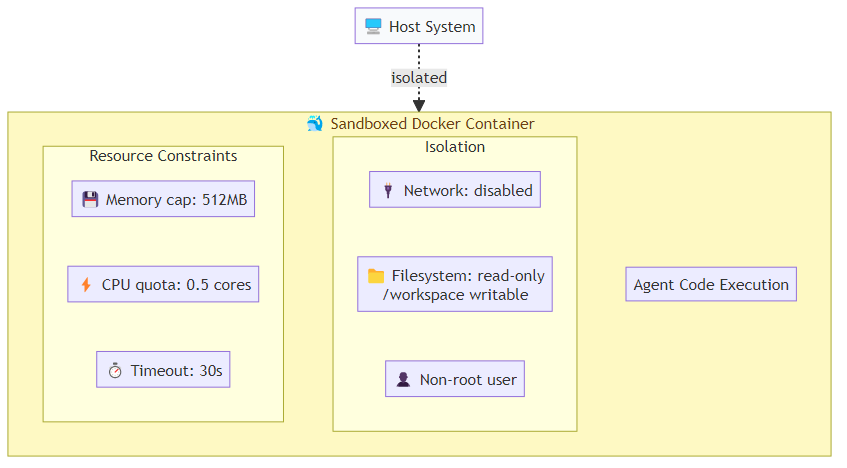
This setup provides strong isolation but has overhead — container startup takes 1-3 seconds, which matters for interactive agent workflows. For batch processing tasks, this overhead is acceptable. For real-time applications, consider container pooling (maintaining a pool of pre-started sandbox containers) or VM-based alternatives like Firecracker microVMs.
E2B and Cloud Sandbox Providers
Several providers now offer managed cloud sandboxes specifically designed for agent code execution. E2B (formerly CodeInterpreter API) is the most widely used. Rather than managing containers directly, you open a sandboxed session, submit code to execute inside it, and receive structured results — including stdout, stderr, rich outputs like charts, and any error information. The sandbox lifetime is managed for you, and the session closes cleanly when you are done.
E2B handles the container lifecycle, provides network access controls, and includes a Jupyter kernel for interactive code execution. The trade-off vs. self-hosted Docker is control: E2B makes common cases easy but limits customization for unusual security requirements.
For most teams, managed sandbox providers are the right starting point. Self-hosted sandboxing makes sense when you have specific compliance requirements, unusual network topology needs, or cost structures where managed providers become expensive at scale.
Browser Sandboxing for Web-Browsing Agents
Code execution is not the only sandboxing challenge. Agents that browse the web face different attack surfaces:
Prompt injection via web content: malicious web pages embed instructions that the agent interprets as user commands. Mitigation requires a clear separation between "trusted instructions" (from the user/system) and "untrusted content" (from external sources), enforced in the agent's reasoning not just its tooling.
Credential theft: an agent with access to user credentials (for logging into services on behalf of the user) can be manipulated into sending those credentials to malicious endpoints. Browser agents should use session isolation — separate browser profiles per task, with credentials scoped to specific trusted domains.
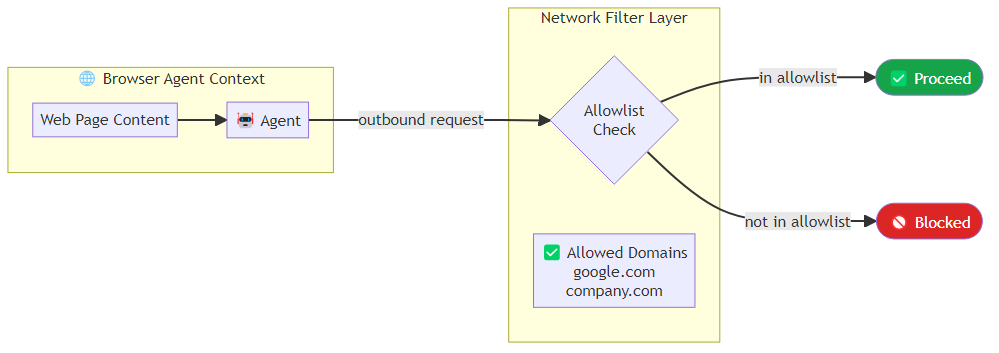
Data exfiltration: an agent reading sensitive documents on behalf of the user can be prompted to send that data to external servers. Network egress filtering (blocking requests to non-allowlisted domains) provides a backstop.
For Playwright-based browser automation, you can enforce network filtering at the browser context level. Every outbound request passes through a route handler that checks the destination domain against an allowlist and aborts the request if the domain is not explicitly permitted. The browser is launched with extensions and plugins disabled, and each task runs in an isolated context with no shared storage state from previous sessions.
Trust Boundaries and Privilege Separation
Sandboxing is about defining trust boundaries. The key principle: each component of your agent system should operate with the minimum privileges required for its function.
Design your agent system as a set of trust zones:
Zone 0: Trusted core — the orchestration layer, system prompts, and authentication credentials. This zone has full system access. It is small, audited, and not exposed to agent-generated content.
Zone 1: Agent reasoning — the LLM inference calls. This zone can read task specifications and tool results, but it does not directly execute code or make network calls. Its outputs are treated as instructions to be validated, not commands to be executed.
Zone 2: Tool execution — where code runs and APIs are called. This zone executes agent-specified instructions but within strict resource and network constraints. It cannot modify Zone 0 components.
Zone 3: External content — the web, user documents, database records. This zone is entirely untrusted. Content from this zone is processed in Zone 2 or below, never directly fed into Zone 0.
The architectural discipline of maintaining these zones is more important than any specific sandboxing technology. Many security failures in agent systems occur when developers take a shortcut that collapses zone boundaries — like loading external file content directly into the system prompt.
Monitoring and Anomaly Detection
Even well-sandboxed systems can behave unexpectedly. Runtime monitoring provides an additional safety layer. Every tool call, every external request, and every file modification should be logged in a structured audit record that captures the agent ID, task ID, action type, a risk classification, and a timestamp. High-risk actions trigger an immediate security alert; all actions are inspected by an anomaly detector that flags unusual patterns — for example, an unexpectedly high rate of external API calls within a short window.

Log every tool call, every external request, every file modification. These logs are your forensic record when something goes wrong — and when you deploy agents at scale, something will eventually go wrong.
The Non-Technical Dimension
Sandboxing is a technical discipline, but the decisions about what to sandbox and how strictly are organizational and risk-management decisions. An agent operating on a developer's laptop with access to their personal files has a very different risk profile from an agent operating in a production environment with access to customer data.
Before deploying any agent system, answer these questions explicitly: What is the worst-case damage if this agent is compromised? What actions would constitute an unacceptable outcome? What monitoring would detect that outcome? And critically: what is the recovery path?
If you cannot answer those questions clearly, your sandboxing strategy is not yet complete — regardless of how sophisticated the container configuration is.
Security is not a feature you add at the end. For agent systems, it is a design constraint that shapes every architectural decision from the start.
Explore more from Dr. Jyothi